What Is a Travel Router and Do You Need One?

Most travelers assume a travel router generates internet out of thin air, much like a cellular phone hotspot. In reality, it is a pocket-sized device that creates a private Wi-Fi network from an existing public or hotel signal. It connects to the outside feed once, letting all your gadgets link to a single safe connection instead of logging into public web pages individually.
Deciding to pack one comes down to your devices and your lodging. Anyone traveling light with just a phone can easily skip it. But carrying several screens, needing a strong privacy shield for sensitive work, or staying somewhere that charges fees per device changes things quickly. Here is an easy look at how these small devices work and whether one belongs in your luggage.

- TLR Rank9.2
TLR Rank is a ranking system developed by TravelLuggageReviews.com. TLR Rank has no relationship or impact from any manufacturers or sales agent websites. Learn more
- BrandGL.iNet

- TLR Rank9.2
TLR Rank is a ranking system developed by TravelLuggageReviews.com. TLR Rank has no relationship or impact from any manufacturers or sales agent websites. Learn more
- BrandGL.iNet

- TLR Rank9.2
TLR Rank is a ranking system developed by TravelLuggageReviews.com. TLR Rank has no relationship or impact from any manufacturers or sales agent websites. Learn more
- BrandGL.iNet
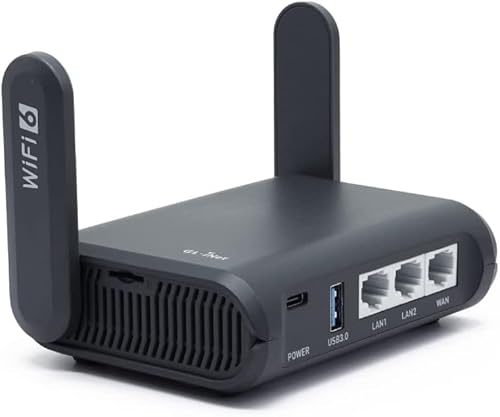
- TLR Rank9.0
TLR Rank is a ranking system developed by TravelLuggageReviews.com. TLR Rank has no relationship or impact from any manufacturers or sales agent websites. Learn more
- BrandGL.iNet

- TLR Rank8.8
TLR Rank is a ranking system developed by TravelLuggageReviews.com. TLR Rank has no relationship or impact from any manufacturers or sales agent websites. Learn more
- BrandGL.iNet

- TLR Rank8.6
TLR Rank is a ranking system developed by TravelLuggageReviews.com. TLR Rank has no relationship or impact from any manufacturers or sales agent websites. Learn more
- BrandGL.iNet
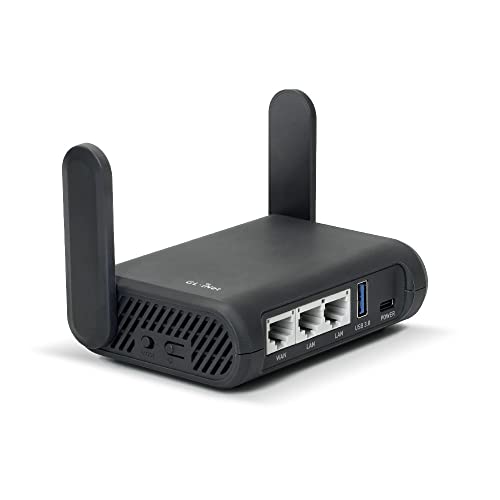
- TLR Rank8.6
TLR Rank is a ranking system developed by TravelLuggageReviews.com. TLR Rank has no relationship or impact from any manufacturers or sales agent websites. Learn more
- BrandGL.iNet

- TLR Rank8.4
TLR Rank is a ranking system developed by TravelLuggageReviews.com. TLR Rank has no relationship or impact from any manufacturers or sales agent websites. Learn more
- BrandTP-Link

- TLR Rank8.0
TLR Rank is a ranking system developed by TravelLuggageReviews.com. TLR Rank has no relationship or impact from any manufacturers or sales agent websites. Learn more
- BrandTP-Link
Last update on 2026-10-23 / Affiliate links / Images, Product Titles, and Product Highlights from Amazon Product Advertising API
What a Travel Router Is and What It Does Not Do
A travel router is a compact wireless unit, usually about the size of a deck of cards or a computer mouse, designed to fit easily into a carry-on bag that fits in the overhead bin or an under-seat personal item. At its core, the device takes an existing internet feed and creates your own private Wi-Fi network around it. Think of it as a personal security guard and traffic manager that travels with you from hotel rooms to vacation rentals.
To understand what this gadget can do, you first need to know what it does not do. A travel router does not generate internet out of thin air. It is not a cellular mobile hotspot puck with its own mobile data subscription, and it does not connect directly to cell towers on its own. If you sit in an empty field with no wireless signals and no wall cables, a travel router cannot get you online.
Instead, the unit acts as a bridge between an outside network and your personal gadgets. It must latch onto an existing internet source that is already present at your lodging. That source can be an Ethernet cable (a physical cord that plugs into a wall jack for wired internet) or an existing wireless broadcast. Once the travel router connects to that outside source, it broadcasts its own private wireless network. You log into the public internet once through the travel router, and all your personal electronics connect directly to your personal router.
This setup creates a protective barrier between your electronics and the rest of the hotel guests. It also solves the headache of managing connections on multiple screens, making your digital life on the road feel just like being at home.
How to Set Up a Travel Router in Your Hotel Room
Setting up the device takes just a couple of minutes once you unpack in your room. Follow this step-by-step process to get your network running:
- Plug the router into electrical power near your desk or nightstand. The router needs steady electrical power from a wall socket or a portable USB battery pack before it can transmit any wireless signals. Most modern travel models use a standard USB cable, making it easy to share a charging block with your phone.
- Connect the travel router to the hotel internet source. If your room has an active Ethernet wall jack, plug a network cord directly into the router's input port for the fastest speeds. If the room only offers wireless access, use your router settings to switch to repeater mode (taking an existing wireless signal and rebroadcasting it as your own network).
- Connect a single phone or laptop to your travel router network. Joining your own private network first allows you to open a web browser and direct the travel router toward the hotel feed. You do this by selecting your private router name on your phone just like you would connect to Wi-Fi at home.
- Open your web browser to clear the hotel login page. This captive portal (the hotel login page where you enter your room number or accept terms) will pop up on your screen right away. Once you enter your room details and accept the terms, the hotel system registers your travel router as an authorized guest.
- Turn on your remaining devices and let them connect automatically. Your travel router broadcasts your familiar SSID (the name of your Wi-Fi network) and password. Because your tablets, e-readers, smart watches, and family phones already remember those credentials from home, every gadget links up immediately without entering room numbers.
After finishing these checks, your entire collection of electronics shares that single approved connection. You never have to repeat the sign-in screen on your watch, your streaming stick, or your work computer.
Travel Router Versus Phone Hotspot: Key Differences
Many travelers wonder why they should pack a separate box when their smartphone already has a built-in mobile hotspot feature. While tethering a phone works fine for checking a quick email at an airport gate, it falls short during an extended stay in a hotel or rental home.
First, phone tethering drains your mobile battery rapidly and causes your phone to heat up. Running a personal hotspot for several hours while streaming a movie or downloading large work files puts heavy stress on your phone's battery. A travel router draws power directly from a wall outlet, keeping your phone cool, charged, and ready for your day out exploring tourist neighborhoods or main hotel strips.
Second, mobile hotspots rely entirely on cellular towers. If you stay in a concrete hotel room or a basement Airbnb with weak cellular reception, your hotspot will slow to a crawl. Cellular roaming limits also apply, especially when traveling abroad where data packages cost extra. A travel router taps into the property's broadband Wi-Fi or wired wall line, saving your mobile data allowance for when you are away from your room.
Third, phone hotspots rarely let your devices communicate with one another. A travel router creates a true local network. This allows you to cast a show from your tablet to a television, print to a portable printer, or transfer photos between a phone and a laptop without sending your private files over the open hotel internet.
Four Practical Wi-Fi Headaches a Travel Router Solves
Public internet at hotels, resorts, and vacation rentals comes with several well-known annoyances. Carrying your own router eliminates the most common frustrations before they ruin your trip.
- Defeating strict device limits. Many hotels and cruise ships restrict each room to two or three active screens, or they charge a steep daily fee for each extra gadget. Because your travel router appears to the lodging system as one single connected device, you can connect your phone, tablet, laptop, and e-reader under a single room authorization without paying extra fees.
- Connecting devices that lack web browsers. Media streaming sticks, smart plugs, and portable gaming gear often lack a built-in browser to handle a captive portal. You cannot type your hotel room number on a streaming stick that only displays a connection error. A travel router solves this because you approve the connection on your phone, allowing your browser-free gadgets to get online immediately.
- Protecting your personal data on shared networks. Open hotel networks put your devices in the same digital room as hundreds of strangers. A travel router creates an isolated local network protected by its own firewall. Many models also support a VPN (a privacy shield that scrambles your web data so strangers cannot see it), which encrypts your browsing activity before it ever touches the hotel equipment.
- Skipping the reconnect routine at every destination. If you travel frequently, retyping Wi-Fi passwords on six different screens gets exhausting. With a travel router, you set your network name and password once. Every time you unpack in a new hotel, your gadgets recognize your private network and connect with zero effort.
Who Actually Needs a Travel Router (and Who Can Skip It)
A travel router is a specialized tool, meaning not every traveler needs to buy one. Your travel style, your device count, and the type of work you do will determine whether this device belongs on your packing list.
You will benefit from a travel router if:
- You travel with family or a group and carry multiple tablets, handheld game consoles, and phones that all need simultaneous internet access.
- You work remotely and must access sensitive business files, client information, or company portals over secured connections.
- You like to bring your own streaming stick to watch movies on the hotel television without logging into hotel accounts.
- You frequently stay in remote rentals, older boutique hotels, or cruise cabins where wall Ethernet jacks provide much faster internet than crowded public Wi-Fi.
You can safely skip a travel router if:
- You travel light with only a smartphone and an under-seat personal item, using cellular data for general maps and messaging.
- You take short weekend getaways to domestic destinations where you do not need to connect laptops or work machines. For example, if you are looking at where to travel without a US passport for a simple beach vacation, relying on a basic phone connection is often plenty.
- You stay only in modern hotels where sign-in pages are fast and you carry no gadgets without screens.
If unexpected delays occur or airline schedules shift, knowing what is a travel waiver can protect your budget, while your travel router ensures you stay productive from an airport lounge while rebooking your flights.
What to Check Before Choosing a Travel Router
When shopping for a travel router, focus on practical features that match how you pack and move. The best option is one that balances portability with straightforward network controls.
First, check the power input. Choose a model that powers via a standard USB connection. Carrying a single USB wall charger and cable that works for both your phone and your router saves luggage space and eliminates heavy proprietary power bricks.
Second, verify the physical ports. Look for at least one Ethernet port, though two ports give you greater flexibility. Having two ports means you can plug the router into the hotel wall jack while running a wired cord directly to your work laptop for steady video calls.
Third, confirm built-in privacy support. If you plan to shield your data from hotel snoopers, select a router that allows you to configure your preferred privacy shield directly on the hardware. This protects every connected screen automatically without running separate software apps on each phone or tablet.
Finally, examine the physical dimensions. A good travel model should be light enough to slip into an accessory pouch without adding noticeable weight to your carry-on luggage.
Frequently Asked Questions
Does a travel router make hotel Wi-Fi faster?
A travel router cannot make the hotel internet connection faster than its incoming service cap, but it can make your local connection much more stable. If you plug into a wired wall jack, you bypass congested wireless channels that slow down other guests. The router also manages bandwidth efficiently among your own devices so your connection drops less often.
Can I use a travel router on a cruise ship?
Many passengers use travel routers on cruise ships to share a single satellite internet package among multiple personal gadgets. But cruise ship sign-in systems vary, and some cruise lines actively discourage or block personal routers. Always check the cruise line guest policies before your voyage to verify their specific internet rules.
Do I need to pay a monthly subscription fee to use a travel router?
A travel router is a piece of hardware that you purchase once with no mandatory monthly hardware fees. It uses the existing internet connection provided by your lodging. The only ongoing cost you might encounter is an optional third-party privacy shield service if you choose to encrypt your web traffic through a private server.
Will a travel router work on airplanes?
Most commercial airlines prohibit personal routers from broadcasting wireless signals during flight because they can interfere with aircraft communication systems. In addition, airplane Wi-Fi networks are designed to manage devices individually through specialized portals. Keep your travel router packed away until you arrive at your lodging.


Best Affordable Carry On Luggage 2026 - 11 Most Loving

The 12 Best Carry On Luggage For Bad Back 2026 - Top Choices
Best Tandem Double Buggy 2026 - 11 Best Rating

Top 12 Kids Rolling Suitcases for Fun and Easy Travel
The Ultimate Guide to Choosing the Best 8 Wheel Suitcase

Best Lightest carry on luggage with wheels in 2026

Top Airport Traveling Suitcases: Our 11 Best Picks
The Best Prams For Rough Terrain - (2026 Top Choice)