What Is Smart Luggage and Can You Take It on a Plane?

Before packing a smart suitcase, check whether its battery comes out and what your airline allows. Smart luggage is a suitcase with built-in features, such as a phone-charging port, a way to find the bag’s location, or controls through a phone app.
Not every suitcase has the same features, and a charging port may need a separate battery or cable to work. Whether the bag can fly as planned depends on its battery, whether you can remove it, and your airline’s rules for batteries and carry-on size. The extra features may be useful on a long travel day, but a regular carry-on may be simpler if you do not need them. First, here’s what to look for and check.

- TLR Rank9.7
TLR Rank is a ranking system developed by TravelLuggageReviews.com. TLR Rank has no relationship or impact from any manufacturers or sales agent websites. Learn more
- BrandWrangler

- TLR Rank8.6
TLR Rank is a ranking system developed by TravelLuggageReviews.com. TLR Rank has no relationship or impact from any manufacturers or sales agent websites. Learn more
- BrandAOTOS
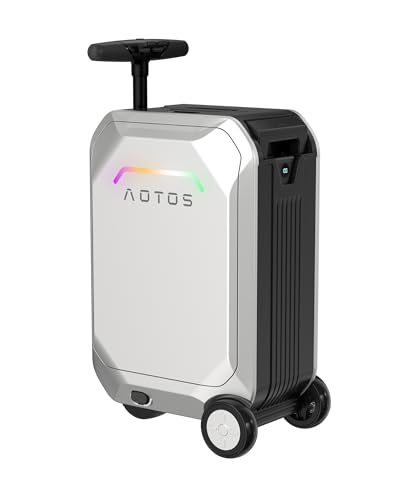
AOTOS Smart Rideable luggage-Roller carry-on luggage 22x14x9-TSA,Airline-Approved 22 inch Hardshell,Zipperless
View on Amazon- TLR Rank7.6
TLR Rank is a ranking system developed by TravelLuggageReviews.com. TLR Rank has no relationship or impact from any manufacturers or sales agent websites. Learn more
- BrandAOTOS

AOTOS Smart Rideable Luggage-Roller Carry-on Luggage 22x14x9-TSA, Airline-Approved 22'' Hardshell,
View on Amazon- TLR Rank7.3
TLR Rank is a ranking system developed by TravelLuggageReviews.com. TLR Rank has no relationship or impact from any manufacturers or sales agent websites. Learn more
- BrandAOTOS
Last update on 2026-11-14 / Affiliate links / Images, Product Titles, and Product Highlights from Amazon Product Advertising API
What does smart luggage actually do?
Smart luggage has one or more features built into the suitcase to make part of a trip easier. The label doesn’t promise a standard set of features. One bag may have a USB port for connecting a charging cable, while another may offer location tracking or phone app controls.
Think of “smart” as a description of added functions, not a guarantee that the suitcase will charge your phone, show its location, or connect to an app. Read the feature list for the exact bag you’re considering, then decide whether those functions solve a problem you actually have.
- Charging: A USB port is a socket for connecting a charging cable. It may let you charge a phone from a separate battery inside the bag, but check whether that battery is included or must be supplied separately.
- Location tracking: A tracker may help you find a bag through a phone or tracking network. Check how the feature works, whether it needs an app, and whether you need to add a separate tracking device.
- App control: App control means using a phone app to operate a feature or view information. The app may be needed for some functions, but not necessarily for the suitcase to roll or open.
- Other built-in functions: Some bags add features such as a phone holder or cup holder. These may be handy during a wait, but they are different from electronic features and don’t necessarily require a battery.
For example, a charging port can be useful when you’re waiting at the gate and your phone battery is low. But if you already carry a small battery pack, a port alone may not be a reason to choose one suitcase over another.
Which features should you check?
Smart luggage varies from bag to bag. Don’t assume that a feature shown in one suitcase’s description is included in another suitcase with the same “smart” label. Before buying, check the specific product page and instructions for these details:
- What the feature does: Look for a clear description of the function. “Charging port” tells you there’s a place to connect a cable, but it doesn’t by itself tell you whether a battery comes with the bag.
- What you need to provide: Check whether the bag includes a battery, tracking device, cable, or other item needed to use the feature. If something is sold separately, decide whether you want to carry and keep track of it.
- How it works: If a feature uses an app, check which app is required and what the maker says you need to do to connect it. If you don’t want to manage another app while traveling, look for a function that works without one.
- What happens when the battery is empty: Check whether the suitcase still works as ordinary luggage if its electronic feature loses power. You should be able to understand how to pack and roll the bag even if you don’t use the added functions.
- Where the battery sits and how it comes out: Look for instructions showing where to find it and how to remove it. Don’t assume that a battery is removable just because the suitcase has an electronic feature.
A USB port is not the same thing as a power source. If you expect to charge a phone during a long airport wait, confirm exactly what supplies power to the port and what you need to bring. Also make sure you can reach the connection without unpacking the suitcase, if that matters to you.
Location tracking also has limits that vary by device and service. Read the maker’s description to see how the location is found and whether the feature depends on your phone, an app, or another device. Don’t rely on a tracking feature as a substitute for putting your name and contact details on your luggage.
Can you take the battery on a plane?
Check the battery instructions before flying, and follow your airline’s rules. If the battery can be removed, the airline may require you to take it out and keep it with you in the cabin. If it can’t be removed, the airline may not let you bring the bag, so confirm the rule before packing.
Airline requirements can depend on the battery and how it is installed. There isn’t one answer for every smart suitcase. Check the bag maker’s instructions and the airline’s current rules for your specific flight, especially before you leave for the airport.
- Find the battery information: Check the product page, label, and instructions for the battery type and any stated capacity. Don’t guess based on the suitcase’s name or appearance.
- Confirm whether it comes out: Look for a clear removal method in the instructions. If the steps are unclear, ask the maker before you buy or travel.
- Check your airline: Search the airline’s current guidance for batteries in luggage. If you have a connecting flight or more than one airline, check each carrier’s rules.
- Pack as directed: If the airline requires the battery to be removed, take it out before checking the suitcase and carry it as the airline instructs. Protect it from damage and keep it from touching loose metal items.
- Ask before you go: If the battery cannot be removed, or the airline’s instructions don’t clearly cover your bag, contact the airline before arriving at the airport.
Don’t wait until the check-in counter to discover that the battery can’t be removed. You may have to change how you pack, leave the bag behind, or make other arrangements. A quick check before buying can prevent a stressful conversation when you’re already trying to catch a flight.
If you notice a battery that is damaged, swollen, unusually hot, or leaking, don’t pack or use it. Keep away from it and contact the airline or the battery’s maker for safe next steps. Don’t try to repair a damaged battery yourself.
How do you check carry-on size and rules?
A bag that fits one airline’s carry-on rules may not fit another’s. Airlines set their own size limits, and some international carriers use tighter limits than many U.S. domestic airlines. Check the rules for the airline operating each flight, not just the airline that sold you the ticket.
- Find the carry-on limit for your flight. Open the airline’s current baggage page and look for the size allowed in the cabin. Check the operating airline if another carrier is flying part of your trip.
- Check how the airline measures. Use the outside size, including wheels and handles, if the airline includes them in its limit. Compare the bag’s listed outside measurements with the airline’s limit, rather than looking only at a label such as “carry-on size.”
- Allow for parts that stick out. Check the wheels, handles, pockets, and any attached accessories. A bag can look small in a product photo but exceed the limit once those parts are included.
- Confirm the battery plan. If the airline requires a removable battery, make sure you know how to remove it and where to keep it during the flight. Check this before packing, not at the gate.
- Review the rules again before departure. Airline guidance can change, and a tight connection may involve another carrier. If anything is unclear, ask the airline to confirm the rule for your bag and battery.
If you’re unsure about a bag’s fit, compare its listed outside measurements with the airline’s size limit before you buy. Our guide to carry-on luggage for airline size confidence may help you think through sizing for a trip with international flights. No bag is guaranteed to fit every airline’s limits.
Is smart luggage better than regular luggage?
Smart luggage is a better fit when a specific added feature will help with your travel routine and you’re comfortable checking its battery and airline requirements. Regular luggage may be enough if you mainly need space for your belongings, wheels, and a handle. You don’t need electronic features just because a suitcase has them.
Imagine you often reach the gate with a nearly empty phone. A charging port could be useful if the bag’s power setup works for you and you’re willing to follow the battery rules. If you already carry a battery pack, the suitcase’s charging feature may add little.
Location tracking may appeal if you want another way to locate a bag. But check how the tracker works and what you must do to use it. If setting up an app or carrying another device sounds like a nuisance, that feature may not be worth the added steps.
A regular carry-on can also be the simpler choice if you want fewer things to remember before boarding. You still need to check the airline’s size limit, but you won’t have to make a plan for a suitcase battery if the bag has no battery-powered features. If you mainly want to avoid checking your bag, focus first on outside size and the airline’s rules. This carry-on luggage guide for avoiding gate checks can help you compare that concern with the features you might want.
Choose based on the problem you want to solve. If an added feature would sit unused, a regular carry-on may suit you just as well. If you’ll use the feature often, confirm its requirements before letting it decide your purchase.
What should you look for in a smart carry-on?
Start with a carry-on that fits the airline you plan to fly, then decide whether a built-in feature would make the trip easier. Check the exact feature list, what you need to provide, and whether the battery can be removed. Ask the airline if its battery guidance doesn’t clearly cover the suitcase you’re considering.
Don’t choose a bag just because the word “smart” sounds useful. A charging port won’t help if the power source is unclear, and an app feature won’t help if you don’t want to use an app. The right added feature is one you understand, can use, and can bring on your flight under your airline’s rules.
FAQs
Does every smart suitcase charge a phone?
No. Smart luggage can have different features, and some bags don’t include a charging port. Even when a port is present, check whether the bag includes a battery or requires you to supply one.
Does smart luggage have to connect to an app?
No. Some features use a phone app, while others may work without one. Check the instructions for the exact bag to see which features need an app and what setup they require.
Can you use smart features after checking the suitcase?
That depends on the feature and the airline’s battery rules. If the battery must be removed before the bag is checked, its battery-powered features won’t be available from inside the suitcase during that part of the trip. Follow the airline’s instructions for the battery.
Is smart luggage worth it if you already carry a battery pack?
It may not be, especially if charging is the only added feature you want. Compare what the suitcase adds with what you already carry, then check whether its other features are useful enough to justify the battery and airline checks.


Best Affordable Carry On Luggage 2026 - 11 Most Loving

The 12 Best Carry On Luggage For Bad Back 2026 - Top Choices

Best Lightest carry on luggage with wheels in 2026

Top Airport Traveling Suitcases: Our 11 Best Picks
The Best Delsey Paris Luggage Set 2026
Top 10 Delsey Softside Luggage Picks for Stress-Free Travel

11 Best Guest Room Luggage Rack of 2026 To Protect Clean Bedding

11 Best Grom Luggage Rack of 2026 For Direct Bolt-On Fit